Profile-WrapFree, open-source LinkedIn post manager
Your LinkedIn, on autopilot. You stay the boss.
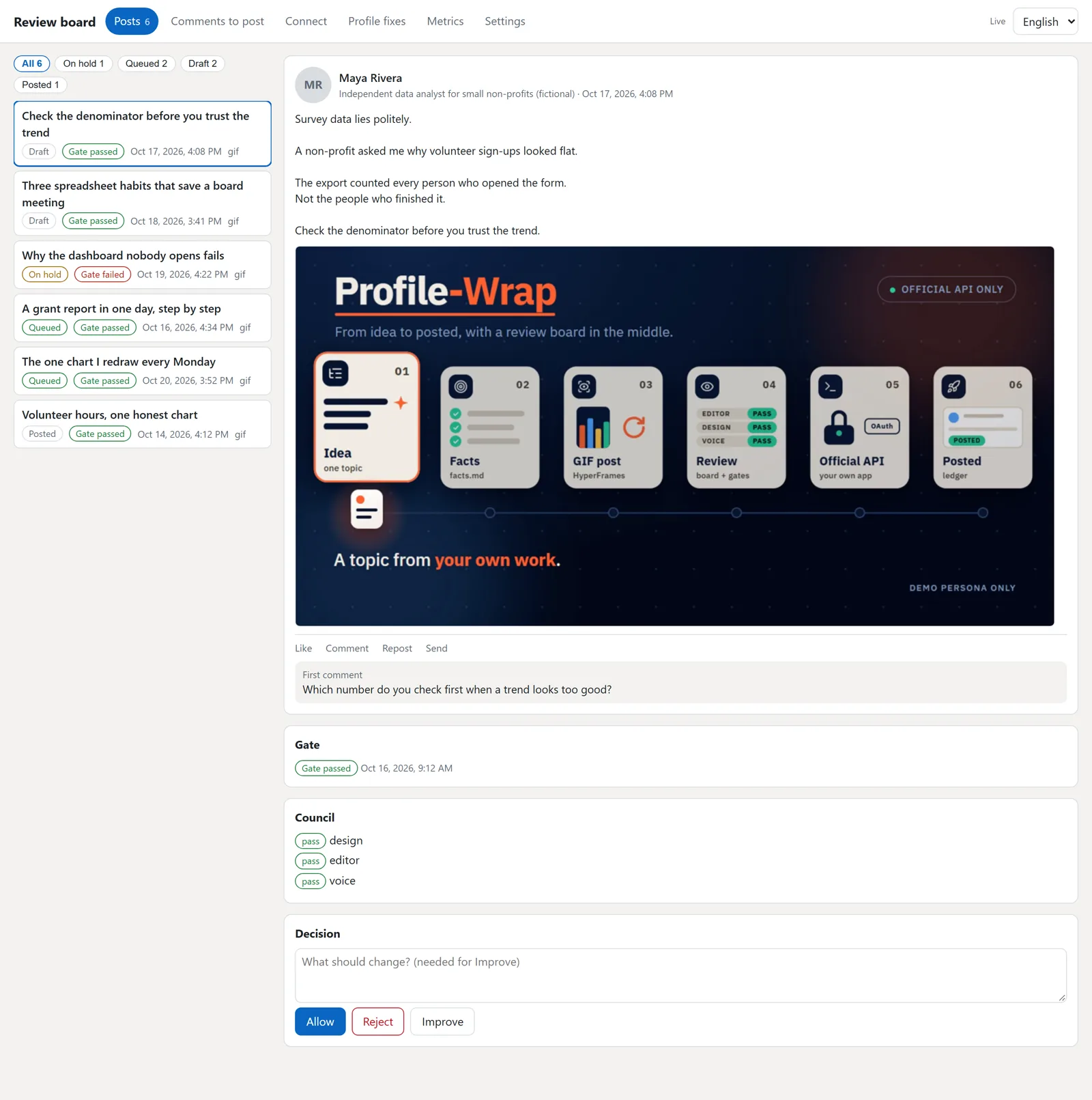
Profile-Wrap is a free, open-source LinkedIn post manager and scheduler. It plans your week of posts, writes them in your voice and checks each one. Nothing goes out until you tap Allow.
3 steps. That is all.
Install it
Ask for your week of posts
Tap Allow on each post you like
Every post waits for you.
Your board shows each post first. You say go.
What it does for you
Checks every post before it goes out
Writes them in your voice
Uses your own AI account
ChatGPT, Claude or Gemini.
Shows you each one first
You approve.
Posts at a good time
Works in English and Arabic
Side by side.
Want to see a person's recent posts? The command profile-wrap read posts can ask two free tools, Apify and Tavily, and then public pages. All are optional and off by default, and you accept the risk of each one yourself.
Is it safe?
- It uses LinkedIn's own official way in.
- It never asks for your LinkedIn password.
- It never reads your private messages.
- Nothing goes out unless you tap Allow.
Pick how you want it.
All free.
Plugin
For Claude Code and Codex.
Install stepsSkills
For any AI agent that reads skills.
Get the skillsMCP server
For any app that speaks MCP.
Set it upDesktop app
No AI app? Use this. Windows, Mac and Linux.
Get the app
Questions
What is Profile-Wrap?
Profile-Wrap is a free, open-source LinkedIn post manager and scheduler. It plans your week of posts, writes them in your voice and checks each one. You tap Allow on the posts you like. It is software for LinkedIn, not related to woodworking machines or other products with a similar name.
Who makes Profile-Wrap?
Nader Alzghoul, a QA automation engineer. The code is on GitHub under the MIT licence.
Is it free?
Yes. The app is free. Writing uses your own AI account (ChatGPT, Claude, Gemini, or a free local one).
Is it safe to connect to LinkedIn?
It uses LinkedIn's own official way in. It never asks for your LinkedIn password, it never reads your private messages, and nothing goes out unless you tap Allow.
Does Profile-Wrap post without asking me?
No. Every post waits on your board until you tap Allow. Tap Reject, or ask for a better one, and nothing posts.
Do I need to code?
No. Install, ask, tap. That is it.
Which one should I pick: plugin, skills, MCP server or desktop app?
Use Claude Code or Codex? Take the plugin. Another AI app? The MCP server. None? The desktop app.
Does it work on Mac, Windows and Linux?
Yes, all three.
Does it work in Arabic?
Yes. Arabic and English, side by side.
Is Profile-Wrap made or endorsed by LinkedIn?
No. It is an independent project, not affiliated with or endorsed by LinkedIn.
My computer asks "are you sure?". Is that normal?
Yes. The app is new and unsigned, so your computer may ask once. The picture guide shows what to tap.
Free, and you can stop any time.
Profile-Wrap is free under the MIT licence.